For those who have long been in the world of martial online, maybe this article is not very useful because you would have understood and have been using this trick. But for general users of these tips may be useful if you want to find a driver who happened to be missing or the manufacturer does not provide driver CD.Notebook Driver Search Tips Using Google ImageThese tips can also help you who are confused and just spin on third-party website provider of drivers who actually do not provide a driver you are looking for.Here are the steps to find the driver notebook using Google's search engine:
Open the Google website. We suggest you use Google's International with the address http://www.google.com
Keep in mind the official website of the manufacturer of your notebook. Eg tochiba is toshiba.com, Lenovo is lenovo.com and so forth.
If you do not know the official website of the notebook manufacturers, do a search using Google. For example you have a notebook that belonged to "gateway", then type in the word is on the form provided. The most visible outcome of the official website of the manufacturer is gateway.com

Notebook Driver Search Tips Using Google Image
Furthermore, remember a good type / series your notebook. Toshiba eg C640, then you need to remember is the word c640. Remember also the operating system will you use like Windows XP, Windows 7 or other versions.

Now do a search of the data that you collected earlier. Misalnnya you wish to search from Toshiba C640 WiFi driver for Windows XP, then type the wifi driver c640 windows xp site: toshiba.com or it could be shortened without a word windows.
Notebook Driver Search Tips Using Google Image
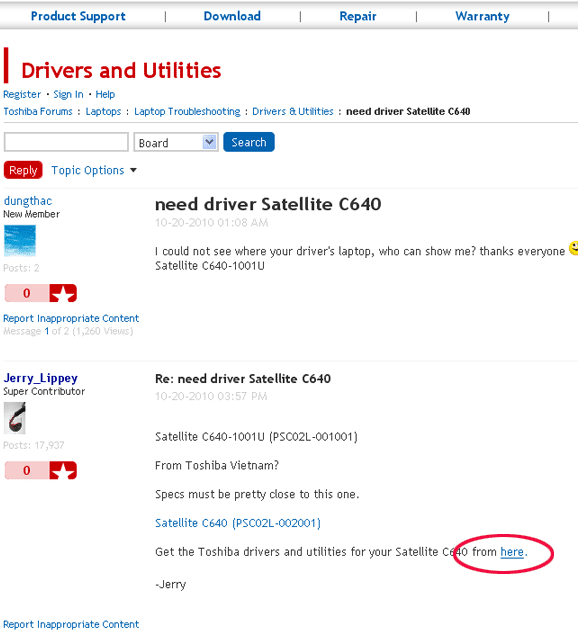
The result, at the very top of search results, there are others who have similar problems to those you encounter. Go to page, from there you know the problem is not resolved.
Notebook Driver Search Tips Using Google Image

Press the Back button on your web browser and open search results in the second row. In the second search, it looks like the problem is resolved, you only need to open a link that has been provided by others to mendownlaod driver you are looking for.
Notebook Driver Search Tips Using Google Image

Open the link, and the available options to find drivers from toshiba C640. Just choose the type of notebook and the OS that is used on notebook.It's finished searching using Google. Although the results are not on the website toshiba.com, you still use these tips to find another driver.Besides using the above ways, you can also use other combinations of words in the look for the drivers from the notebook you have. For example, type in search words like the following"Toshiba Wireless C640 driver download""Webcam Lenovo G460 drivers for Windows XP""Toshiba M505 S4972 Modem driver Win 7"The point remains the creative use of search engines and not to get stuck on one site that "pretend" to provide the driver when in fact the manager of the website just want more visitors without ever providing your needs.Good luck and good luck!» Read More...

Tips that I am presenting is actually directly issued by the Mozilla Firefox, so instead I made. I do not require or recommend my friend to do the tweaking of Mozilla Firefox which my friend had. For the risks and problems that arise, I am not responsible. If my friend has made Mozilla Firefox tweaking, it will not be refunded as in the past, because there is no menu option or setting to restore the original system such as Mozilla Firefox, or setting the default.Accelerate Web Browsing / Blog
Ctrl + Enter, to open the domain you use. Com. way is to type the domain name then click ctrl + enter. for example, my friend wanted to open "www.google.com" so type in "google" and then click ctrl + enter
Shift + Enter, to open the domain you use. Net. way is to type the domain name then click ctrl + enter. for example, my friend wanted to open "www.kabarit.net" so type in "kabarit" then click shif + enter
Ctrl + Shift + Enter, to open the domain you use. Org. way is to type the domain name then click ctrl + enter. for example, my friend wanted to open "www.byet.org" so type in "byet" then click Ctrl + Shift + Enter
Mozilla Firefox TweakingThe way is easy, here are the steps to perform on Mozilla Firefox Tweak:
Type "about: config" in firefox pal then enter
Then it will come out a setting for tweaking firefox
To change this, click 2 times and enter the data changes
If the data below are not in the default setting firefox, right click select New. For numeric data, select Integer, for true / false select Boolean.
For DSL users
Set "network.http.pipelining: true"
Set "network.http.proxy.pipelining: true"
Set "network.http.pipelining.maxrequests: 64
Set "nglayout.initialpaint.delay: 0
For ADSL users
Set "network.http.max-connections: 64
Set "network.http.max-connections-per-server: 21
Set "network.http.max-persistent-connections-per-server: 8
Set "network.http.pipelining: true"
Set "network.http.pipelining.maxrequests: 100
Set "network.http.proxy.pipelining: true"
Set "nglayout.initialpaint.delay: 0
For Dial Up users
Set "browser.cache.disk_cache_ssl: true"
Set "browser.xul.error_pages.enabled: true"
Set "network.http.max-connections: 32
Set "network.http.max-connections-per-server: 8
Set "network.http.max-persistent-connections-per-proxy: 8
Set "network.http.max-persistent-connections-per-server: 4
Set "network.http.pipelining: true"
Set "network.http.pipelining.maxrequests: 8
Set "network.http.proxy.pipelining: true"
Set "plugin.expose_full_path: true"
Set "signed.applets.codebase_principal_support: true"
Set "content.interrupt.parsing: true"
Set "content.max.tokenizing.time: 3000000
Set "content.maxtextrun: 8191
Set "content.notify.backoffcount: 5
Set "content.notify.interval: 750 000
Set "content.notify.ontimer: true"
Set "content.switch.threshold: 750 000
» Read More...